Turn customer actions into timely follow-ups—automatically
Welcome new subscribers, deliver lead magnets, react to dates or product events, and keep every step visible in a journey your team can understand. Start simple and add conditions, integrations, or webhooks only when they create value.
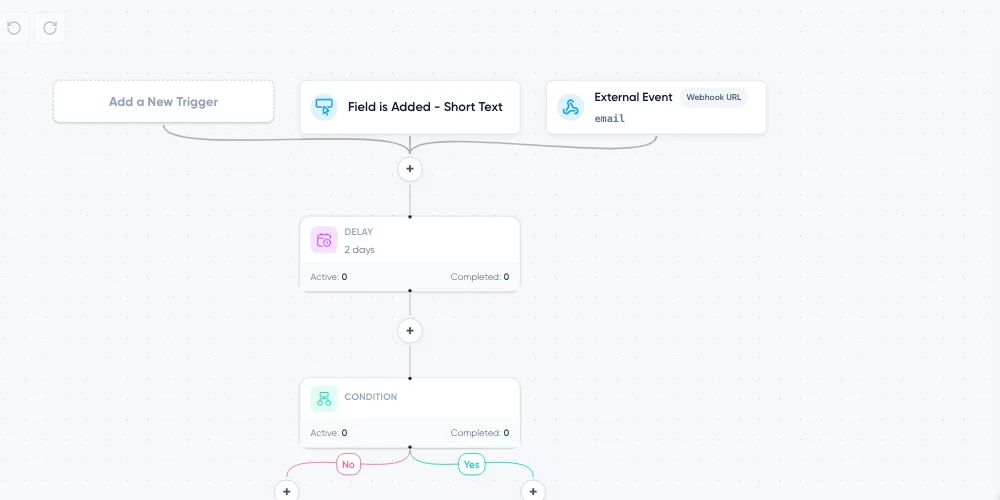
A complete journey can stay this clear
Each step answers a visible business question. Follow the path without decoding an enterprise workflow diagram or searching through disconnected settings. The goal is not automation for its own sake—it is to remove remembering, copying, waiting, and manual handoffs without hiding the customer journey.
See the whole journey before it runs
Build the Automation on a visual canvas. Start with the event that matters, connect the steps, and follow each path from the trigger to the final action.
Add emails, fixed or date-based delays, conditions, field changes, tag changes, other Automation actions, and outgoing webhooks where they belong. Branch the journey when different people need different follow-up while keeping the logic visible.
Start from the signal that matters
Maildroppa can start a journey from:
That gives marketers a direct path for welcome and milestone journeys and developers a clear path for product- or integration-driven events.
Multiple sender profiles
The right sender identity for every message
Manage distinct sender names, email addresses, and reply-to addresses in one account. Use each profile with or without its own verified DKIM domain.
Change senders inside one Automation
Send the first email from one profile and the next from another—ideal for brand handoffs, personal follow-up, or messages from different teams.
Keep brands and teams distinct
Separate products, brands, and conversations without switching accounts or rebuilding sender details before every send.
Choose the right trust setup
Connect a verified DKIM domain where you want your own authenticated sending identity, while keeping profiles without a custom DKIM domain available when that fits the use case.
Deliver the promise while interest is fresh
Connect a form or landing page to the right Signup Flow, start the Automation from confirmed signup, and deliver the lead-magnet link inside the email.
The page, Double Opt-in journey, download, and follow-up remain connected instead of being assembled across separate systems.
Explore Signup Forms and Landing Pages →Make each path more relevant
Use conditions to decide which branch a subscriber should follow. Combine fields, tags, segments, and—in event-driven Automations—temporary event data.
Wait for the right interval, send the message that belongs at that point, and update fields or tags so future segments reflect what happened. The journey can remain as simple as one welcome email or grow into several clear decisions without becoming an unreadable enterprise diagram.
Connect the journey without custom code
Zapier
AVAILABLE NOWUse the public Maildroppa app in Zapier to automate subscriber, tag, field, segment, and Double Opt-in work between Maildroppa and the other apps in your workflow.
Make
PRIVATE APPUse the private Maildroppa app in Make to build visual, multi-step scenarios across the tools that already run the business.
Direct event and webhook paths
Use a Custom Event when your backend can call the Events API. Use an incoming webhook when another tool can send JSON to a unique Automation URL. Use an outgoing webhook when another system should continue after a subscriber reaches a step.
For account-wide notifications, signed account webhooks can notify your system about selected Maildroppa events and provide delivery history, retries, and replay controls.
Change a live journey without guessing what happens to active subscribers
A useful Automation will evolve. The risk is changing the path while subscribers are already moving through it.
For a small, understood correction—update the current Automation with full awareness of active contacts.
For structural changes. Existing subscribers finish the path they entered while future entries use the updated journey.
That makes improvement possible without silently changing the rules halfway through someone’s experience.
Automation ideas you can put to work
Every Automation feature is included in Free
The visual builder, triggers, conditions, branches, delays, lead-magnet delivery, subscriber updates, custom events, incoming webhooks, outgoing webhooks, Zapier, Make, and controlled version changes are included on every plan.
Build Your First Automation FreeFrequently asked questions
Do I need to code an Automation?
No. Common journeys use the visual builder. Zapier and Make provide no-code integration paths. Developers can use custom events, incoming webhooks, outgoing webhooks, account webhooks, and the API.
Can different signup sources start different journeys?
Yes. Start from one specific form, one Signup Flow, or all confirmed signups.
Can I send birthday emails?
Yes. The Date Anniversary trigger can start every year from a stored Date field.
Can I connect Zapier or Make?
Yes. Zapier is publicly available. The Make app is currently available through a private installation.
Can a shop or application start an Automation?
Yes. Use a Custom Event through the API or an incoming webhook URL. Choose the route that matches the external system and security model.
What happens when I change an active Automation?
Use a direct update for a small, understood correction or save a new version for a structural change. A new version lets active subscribers finish their original path while new entries use the updated journey.
Is the full Automation builder included in the free plan?
Yes. Every Automation feature is included on every plan.
Turn the next customer moment into the right follow-up
Map the journey visually, connect the event that matters, and let Maildroppa handle the repeatable work.