Turn visitors into confirmed subscribers—with or without a website
Design forms and complete landing pages visually, publish them on a connected subdomain, and give each offer the right signup journey from submission to confirmation and follow-up.
A better signup is more than a form
The visitor experiences one promise. Behind the scenes, many businesses have to stitch together a page, a form, a consent process, a confirmation email, a confirmation page, and a separate welcome tool.
Maildroppa keeps the whole journey around one subscriber record.
Build Your Signup Journey FreeBuild the experience visually
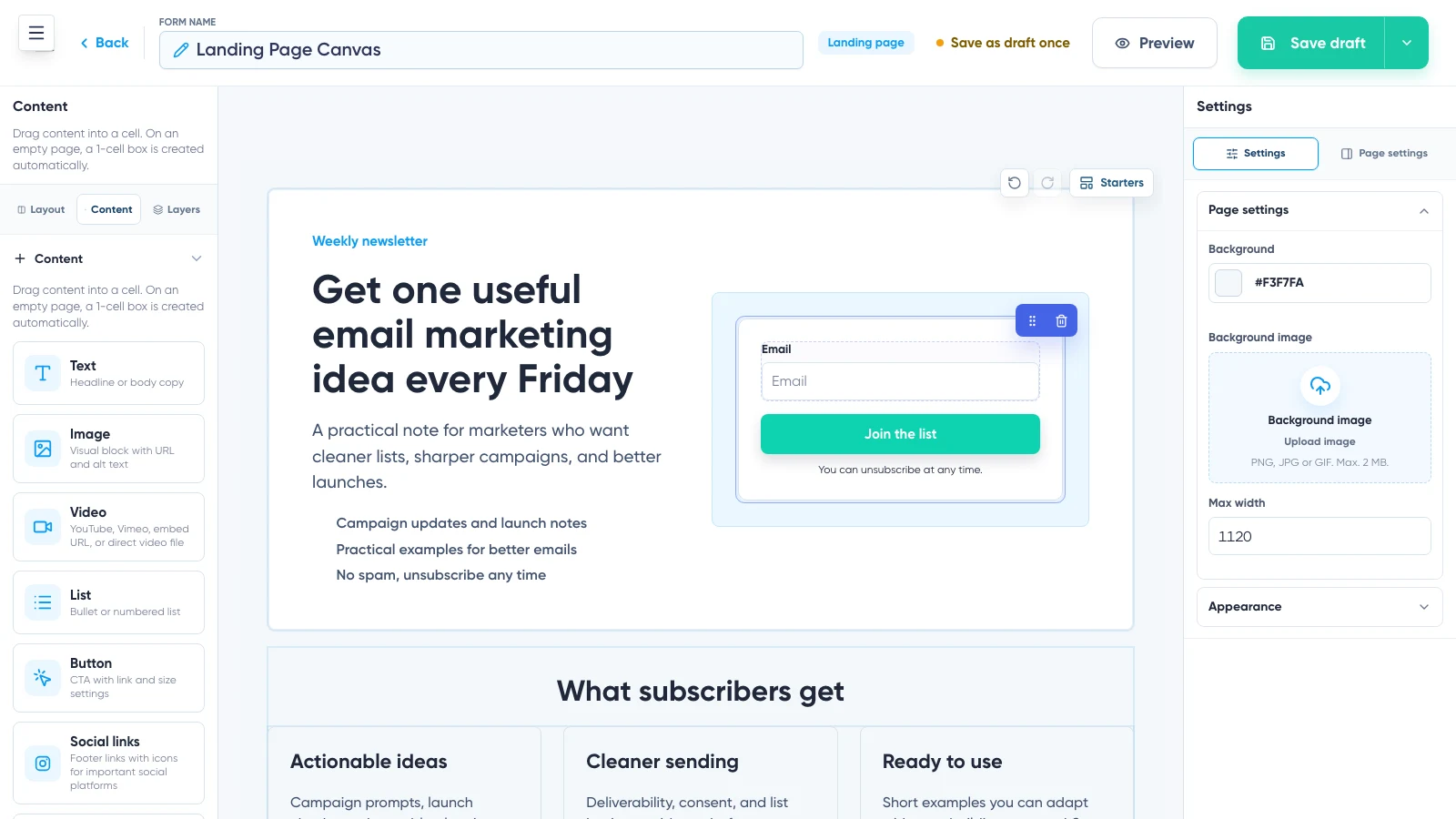
Start with a layout or a purpose-built template. Add headings, text, images, video, buttons, lists, sections, columns, and the signup form itself. Move elements on the canvas, adjust the design, and preview how the real content behaves on wide and narrow screens.
Landing Page
A complete hosted page for a newsletter, lead magnet, event, waitlist, or focused campaign.
Embedded Form
A form placed directly inside an existing page, article, sidebar, or footer.
Popup
A focused offer shown above the page—based on delay, frequency, exit intent, or a page-element click.
Slide-in
A compact invitation that appears at a selected edge of the screen.
Your signup experience should look like part of your business, not a generic widget borrowed from another brand.
Launch a focused landing page without waiting on your website
Create the complete page in Maildroppa and publish it through the standard address or a connected custom domain. Add the TXT and CNAME records Maildroppa provides, wait for verification and HTTPS setup, then assign a unique path to the page.
Draft and publish states keep the live page stable while you prepare the next version. Add the search title and description, social-sharing image, favicon, and hosted-page legal profile before publication.
No existing website is required. Share the final link in ads, social posts, QR codes, messages, or anywhere the offer appears.
Give every offer the right confirmation journey
A general newsletter, downloadable guide, event, and waitlist make different promises. They should not all send the same generic confirmation message. A reusable Signup Flow controls three connected moments:
After submitting the form
What the visitor sees immediately after submitting—a message or a redirect in your own words.
The Double Opt-in email
The confirmation email containing the individual confirmation link—worded for this specific offer.
After confirming
What the subscriber sees after confirming—the moment the promise starts being kept.
Several forms can share a flow when the experience should remain consistent; duplicate it when one offer needs its own wording. The wider welcome journey belongs in an Automation, started from the confirmed signup.
Deliver the promise after confirmation
Select a lead magnet in the Automation email and use the protected Maildroppa download link as the button destination. The subscriber confirms first, then receives the promised guide, checklist, file, or URL offer at the right moment.
The page, Double Opt-in journey, delivery email, and follow-up stay connected instead of being assembled across unrelated systems.
Ask less—and learn what makes the next email relevant
Every additional field adds friction. Collecting no useful context, however, forces every new subscriber into the same generic follow-up. Ask only for information that changes what you will send next. Multi-choice fields let one person select several interests when one answer would be inaccurate.
Apply hidden tags at signup to record source or interest without asking the visitor another question. Later campaigns and Automations use those fields and tags to choose the relevant audience.
Add Maildroppa forms to WordPress without rebuilding them there
Use the dedicated WordPress plugin to place a Maildroppa signup form on a WordPress site while the design, fields, Signup Flow, and subscriber data remain managed in Maildroppa.
Until the public plugin listing is available, active forms can still be added to a website with the generated JavaScript or HTML embed code.
Improve the signup experience with real results
Follow views, submissions, confirmations, and conversion results for forms and landing pages. Compare placements and periods to see where interest becomes a confirmed subscription and where the journey loses people.
Use the report to improve the offer, placement, form length, confirmation wording, or design.
Every signup feature is included in Free
Forms, landing pages, custom domains, Signup Flows, fields, tags, multi-choice answers, conversion reporting, embed code, and lead-magnet delivery through Automations are included on every plan. Use them for up to 100 subscribers and 2,500 emails per month. Maildroppa branding appears on the free plan. No credit card is required and there is no time limit.
Build Your Signup Journey FreeFrequently asked questions
Do I need a website?
No. Build and publish a complete landing page in Maildroppa and share the link directly.
Can I use my own domain?
Yes. Connect a subdomain such as newsletter.yourbrand.com with the TXT and CNAME records Maildroppa provides. A root domain is not connected through this CNAME-based setup.
What exactly does a Signup Flow control?
The after-submit response, the Double Opt-in email, and the after-confirmation response. The wider welcome or lead-magnet follow-up belongs in an Automation.
Can several forms share one Signup Flow?
Yes. Reuse one flow for forms that should share the same confirmation journey, or duplicate it when one offer needs a different experience.
Can a subscriber choose more than one interest?
Yes. Multi-choice fields can store several selected interests and use them later for segmentation, personalization, and follow-up.
Is there a WordPress plugin?
The dedicated plugin is developed and submitted for review. Until the public listing is available, use the generated JavaScript or HTML embed code.
Are custom domains and Signup Flows included in the free plan?
Yes. Every signup feature is included on every plan.
Give every new subscriber a better first experience
Build the page, collect the right information, connect the confirmation journey, and deliver the follow-up that earned the signup.