Contents
the email tool that makes email marketing simple

Billing Details
Published: · Last updated: · By Marcus Biel
In brief
We need your billing details when you sign up for a paid Maildroppa plan, or an affiliate partnership with us.
Before you start
- A paid Maildroppa plan or an affiliate partnership
- Your billing address and, if applicable, a VAT ID
Expected result
Your billing address and VAT details are stored and used for your next invoice.
Troubleshooting
- If the VAT amount on an invoice looks wrong, verify the country in your billing details.
- For login email, password, name, language, or timezone, use the user profile settings instead.
When Billing Details Are Needed
We need your billing details when you sign up for a paid Maildroppa plan, or an affiliate partnership with us.
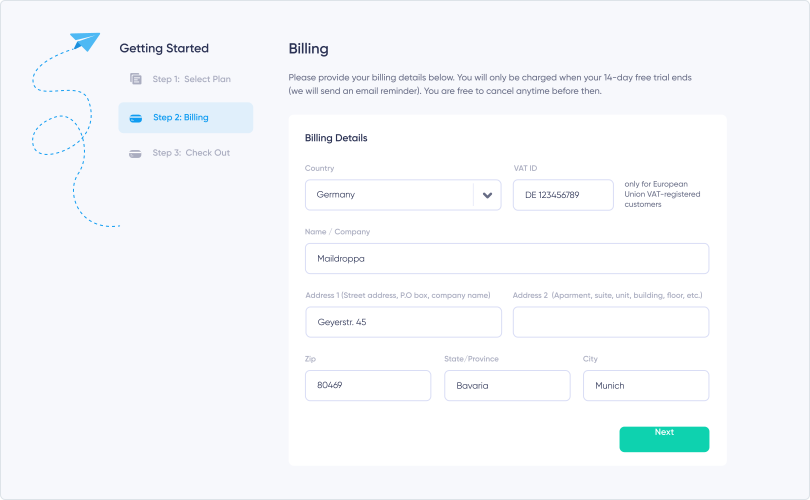
Entering Your Billing Address
If you have already entered your postal address, we will use this address for your billing address. If your billing address is different from your mailing address, you may adjust it, otherwise just click "Next".
Changing Billing Details Later
If you want to change your billing address at a later stage, you can do so at any time within Settings.
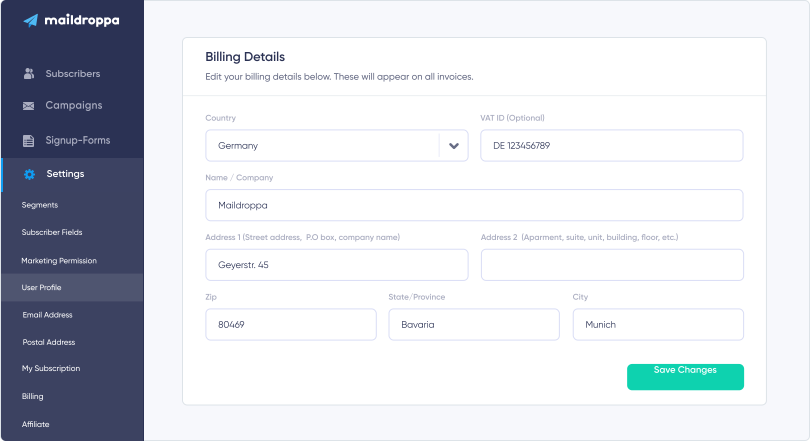
A change to your billing address will be reflected on your next invoice, including any updates to the VAT calculation based on the country you have specified.
For your login email, password, name, language, and timezone, see Managing Your User Profile.
Ready to Send Better Emails?
Stop juggling bloated tools or overpriced plans. Maildroppa offers personal support, privacy-conscious controls, and powerful email marketing - starting free forever.
No credit card required. No time limit.