Contents
the email tool that makes email marketing simple


Managing Your User Profile
Published: · Last updated: · By Marcus Biel
In brief
Learn how to update your Maildroppa profile email, reset your password, change your name, choose the app language and set your timezone.
The User Profile page contains the login and display preferences for your signed-in Maildroppa account: your profile email, password reset, name, app language and timezone.
Open Settings, expand Account & Billing, and select User Profile. You can also open the page directly at https://app.maildroppa.com/settings/user-profile.
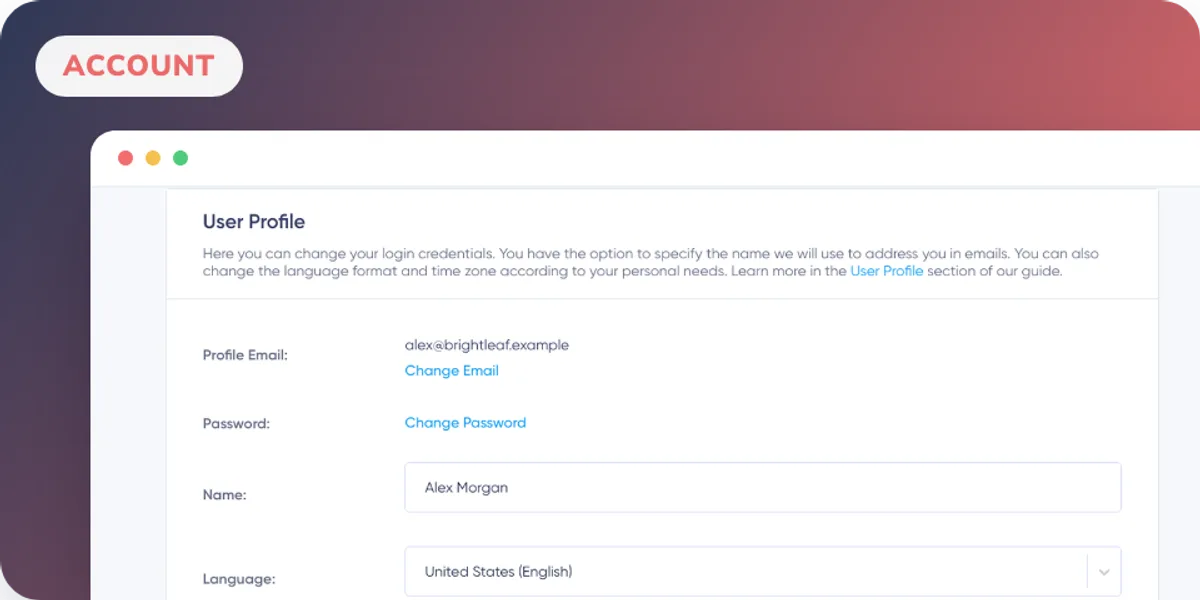
Profile Email
Your profile email is the address you use to sign in to Maildroppa. Maildroppa also uses it for account-related communication.
Select Change Email, enter the new address and submit the dialog. Maildroppa sends a confirmation message to the new address so that a typo cannot silently lock you out. Complete the confirmation from that email before relying on the new address for sign-in.
Password
Select Change Password to request a password-reset email for your current profile email address. Follow the secure link in that message to choose the new password. The password itself is not displayed or edited on the User Profile page.
Name
Use Name for the account name Maildroppa can use when addressing you in account-related communication. Update the field and select Save Changes together with any language or timezone changes.
Language
Use Language to choose the language of the Maildroppa app. The interface switches to the selected language after you save the profile.
This setting changes the app interface. It does not translate campaign content, templates or subscriber data.
Timezone
Use Timezone to choose the timezone Maildroppa should use when presenting local dates and times. Select the entry that matches your working location and save the profile.
Where a date must remain unambiguous for contractual, billing or audit purposes, Maildroppa may display it in UTC and label it accordingly.
Saving Profile Changes
The Name, Language and Timezone fields are saved together with Save Changes. Profile email and password changes use their separate confirmation flows described above.
Subscription and invoice-address settings are documented separately in My Subscription and Billing Details.
Ready to Send Better Emails?
Stop juggling bloated tools or overpriced plans. Maildroppa offers personal support, privacy-conscious controls, and powerful email marketing - starting free forever.
No credit card required. No time limit.